What's Actually Inside an AI Agent (And Why Most of It Isn't AI)

President, Zaruko
Table of Contents
Part 1 of 2: Building VerifyFilings, an AI Agent for Financial Statement Analysis
Everyone is talking about AI agents. Most of the conversation is abstract: agents will transform this, automate that, disrupt the other thing. Very little of it comes from people who have actually built one.
Most executives evaluating AI agents are dramatically underestimating what it takes to make them work. The AI part, the language model, is a small fraction of the total system. The rest is traditional software engineering. If you don't understand that ratio, you'll misjudge the cost, the timeline, and the talent you need.
I built one to test this firsthand.
The result is VerifyFilings, an AI agent that reads public company SEC filings, runs hundreds of automated checks across years of financial statements, and produces a plain-English report explaining what it found. The kind of analysis that would take a financial analyst days of manual work, completed in under 60 seconds.
Here's what's inside it, and why the breakdown matters for anyone evaluating AI projects.
The Agent: A Five-Step Pipeline
When a user types in a stock ticker, the agent runs a sequence of five steps. Each step feeds its results to the next, like an assembly line.
Step 1: Data Retrieval. The agent connects to the SEC's EDGAR database and pulls a company's annual 10-K filings in structured format, typically covering 10 or more years of financial history. This is a straightforward API call. No AI involved.
Step 2: Data Extraction. The raw filing data gets parsed and normalized into clean financial statements: income statements, balance sheets, and cash flow statements, all aligned across reporting periods. This is data wrangling using standard data science tools. No AI involved.
Step 3: Automated Error Detection. Five categories of checks run against the data. Arithmetic consistency: do the numbers within each statement add up correctly? Cross-statement reconciliation: do figures that appear on multiple statements agree with each other? Benford's Law analysis: does the digit distribution of reported numbers follow expected statistical patterns, or show signs of manipulation? Year-over-year anomaly detection: are there unusual spikes or drops? Accounting red flags: are there patterns commonly associated with aggressive accounting? All of this is mathematics and statistics. No AI involved.
Step 4: Value Scoring. The agent evaluates the company against a set of criteria derived from the investment philosophies of Benjamin Graham and Warren Buffett, using current market data. This is rule-based scoring. No AI involved.
Step 5: Narrative Generation. Now, finally, the AI enters the picture. After all the quantitative work is done, the agent hands the complete set of findings to Claude Sonnet 4.6, Anthropic's large language model. Claude reads hundreds of data points and findings, identifies the patterns that matter most, and writes two narrative sections: a concise executive summary and a detailed analysis explaining what the numbers mean for investors.
To give you a sense of what this looks like in practice: in one recent analysis, the agent flagged a multi-year divergence between a company's reported net income and its operating cash flow, combined with a sudden acceleration in receivables growth. Those are patterns often associated with aggressive revenue recognition. The quantitative checks caught the numbers. The AI connected the dots and explained why they mattered together. Neither piece works without the other.
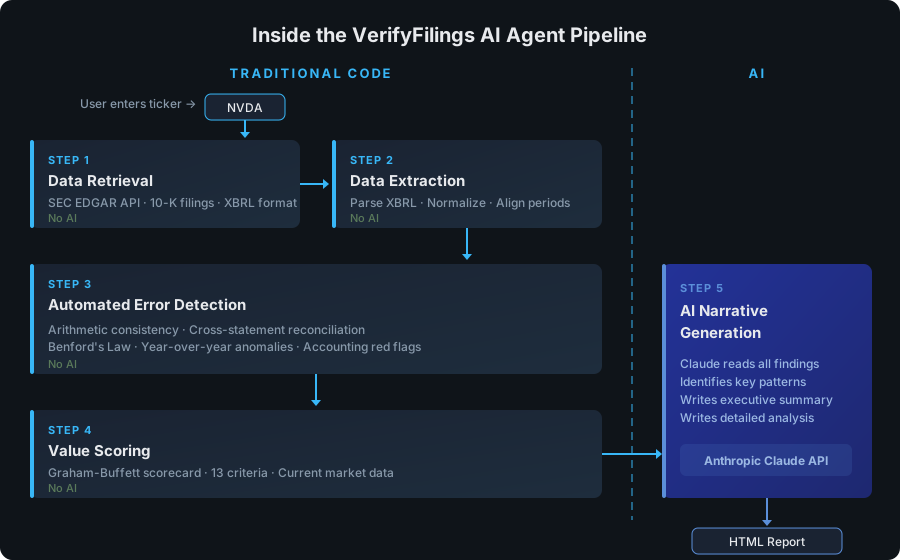
The five-step VerifyFilings pipeline. Steps 1 through 4 are traditional code. Only Step 5 uses AI.
Notice the pattern. Four of the five steps are traditional software: API calls, data processing, statistical analysis, rule-based logic. The AI handles one step, the part that requires synthesis, turning a pile of quantitative findings into a narrative a human can actually use.
A different agent would have a different pipeline. A customer service agent might have fewer data processing steps and more AI-driven conversation. A code review agent might lean heavily on AI for pattern recognition. The five steps above are specific to VerifyFilings and the problem it solves. What's worth paying attention to is the general principle: even in an AI agent, a significant portion of the work is traditional engineering.
The Key Design Principle
This separation was deliberate. I never ask the AI to do math. I never ask it to fetch data. I never ask it to apply rules. Those tasks have deterministic, verifiable answers, and traditional code handles them perfectly.
The AI does what it's good at: reading a complex set of findings, recognizing which patterns are most significant, and explaining them in plain language. That's synthesis, exactly where large language models excel.
If you remember one thing from this article, make it this: a well-designed AI agent is mostly not AI. It's traditional software doing precise, reliable work, with AI handling the parts that need interpretation and synthesis.
This has direct implications for your business. When someone pitches you an "AI-powered solution," the first question you should ask is: what percentage of this system is actually AI, and what's the engineering around it? That question will tell you a lot about whether the solution is well-designed or whether someone slapped a language model on top of a problem that needed real software engineering.
The Wrapper: Everything Else You Need
Now here's the part that surprises most people. Building the agent, the five-step pipeline I just described, was roughly half the work. The other half was everything required to turn that agent into something anyone could actually use.
The original version of VerifyFilings was a command-line tool. I'd run a script from my terminal, wait a minute, and get an HTML file with the report. Useful for me. Useless for everyone else.
To make it a real product, I had to build a complete web application around it. Here's what that involved:
A user interface. Someone needs to be able to type in a ticker symbol, see real-time progress updates while the agent works ("Fetching SEC filings...", "Running error detection...", "Generating analysis..."), and then view the finished report in their browser. Without those progress updates, a user is staring at a blank screen for 60 seconds wondering if anything is happening. That real-time feedback required a streaming connection from the Python agent back to the browser, a meaningful piece of engineering on its own.
Authentication. Users need to sign in. That means integrating with Google and Apple for OAuth, managing sessions, and handling the edge cases that come with any identity system.
A database. Reports need to be stored so they don't have to be regenerated every time someone looks up the same company. User accounts, usage logs, and rate limiting records all need a home. I used PostgreSQL for all of it.
Caching logic. Once a report is generated for a company, it's stored permanently. The next time anyone requests that company, the cached report loads instantly. This is both a performance optimization and a cost optimization, since every new report requires API calls to both the SEC and Anthropic.
Deployment infrastructure. The whole system, the Python agent and the web application, runs inside a single Docker container deployed on a cloud hosting platform. When I push code to the repository, the new version deploys automatically. Keeping it in a single container was a deliberate choice to avoid the complexity of managing multiple services.
Usage analytics. An admin dashboard tracks how the system is being used: which companies are being analyzed, how often, response times, error rates. This isn't glamorous, but it's essential for running a real service.
None of this is AI. All of it is necessary.
The Ratio That Business Leaders Need to Understand
Here's why this matters for you, even if you never plan to build an AI agent yourself.
When AI vendors pitch their products, the demo always focuses on the impressive AI part: look at this analysis, look at this summary, look at this recommendation. What they rarely show you is the engineering iceberg underneath: the data pipelines, the authentication, the error handling, the caching, the monitoring, the deployment, the security.
In my experience building VerifyFilings, the AI component, the Claude API integration, was maybe 15-20% of the total effort. The remaining 80% was software engineering that has nothing to do with artificial intelligence. Your ratio will vary. An agent that relies more heavily on AI for decision-making or multi-turn conversation will have a higher AI percentage. But in every case I've seen, the engineering around the AI is a larger piece than most people expect.
This isn't just my experience. McKinsey reached a similar conclusion in their 2024 analysis of enterprise AI projects, finding that the models themselves account for roughly 15% of a typical project effort. The remaining 85% goes to engineering, integration, data management, and change management. They also found that for every dollar spent developing an AI model, companies should expect to spend about three dollars on change management alone.1
The market-level spending data tells the same story. According to Menlo Ventures' 2025 State of Generative AI in the Enterprise report, companies spent $37 billion on generative AI in 2025. The largest share, $19 billion, went to applications, the user-facing products and software built on top of AI models. Another $18 billion went to infrastructure: model training, data storage, retrieval, and orchestration. Foundation model APIs themselves represented $12.5 billion of that infrastructure spend, roughly one-third of the total market. The other two-thirds? Engineering.2
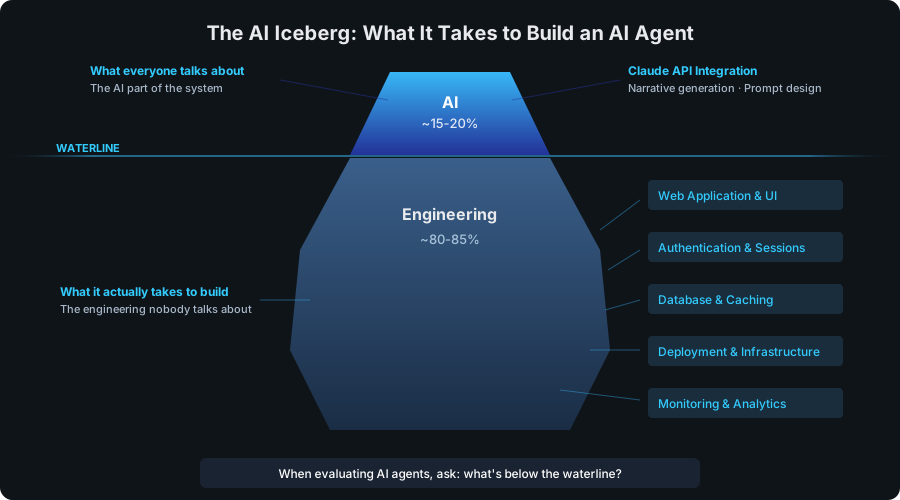
The AI iceberg. The AI component was roughly 15-20% of the total effort. The engineering underneath is consistently larger than most people expect.
Regardless of the exact split, the practical consequences for business leaders are real:
Budgeting. If your AI budget only covers the model, you don't have an AI strategy. You have a prototype. Budget for the full stack: data pipelines, infrastructure, monitoring, security, and deployment.
Hiring. You don't just need people who understand AI. You need software engineers who can build the systems around it. In most cases, the engineering talent matters more than the AI expertise.
Vendor evaluation. When evaluating AI vendors, ask about their infrastructure, their data handling, their error recovery, their monitoring. If they can only talk about their model and not their engineering, that's a red flag.
Timeline expectations. The AI prototype is the fast part. The production system around it is what takes months. If someone tells you they can build an AI agent in two weeks, ask them what they mean by "build."
The Decisions That Determine Whether an AI Agent Is Trustworthy
Beyond understanding what's inside an AI agent, business leaders need to understand the design decisions that separate a reliable system from a liability. Every AI agent requires judgment calls that directly affect its risk profile. I'll walk through three decisions I made with VerifyFilings.
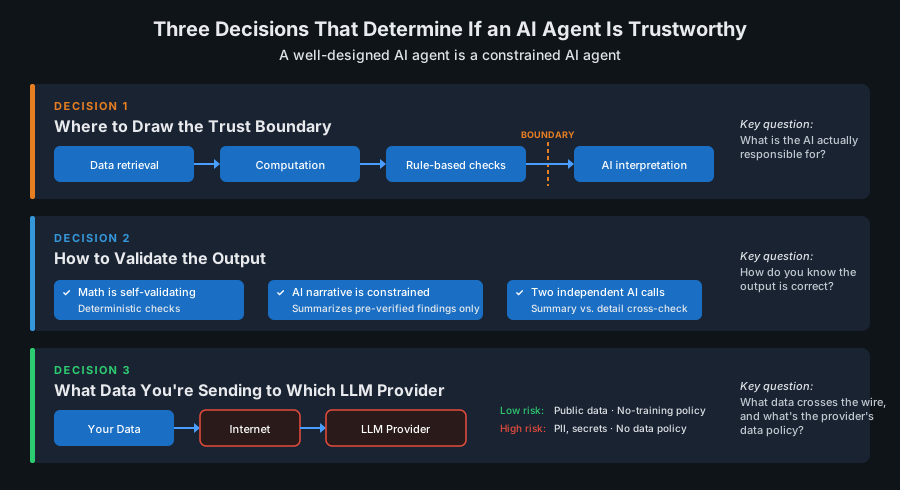
Three design decisions that determine whether an AI agent is trustworthy. Each one is about constraining what the AI can do.
Decision 1: Where to Draw the Trust Boundary
The single most important design decision in any AI agent is this: what does the AI handle, and what does traditional code handle?
This is what I call the trust boundary. On one side, you have tasks where you need deterministic, verifiable results. On the other side, you have tasks where you need judgment, synthesis, or natural language communication.
With VerifyFilings, I drew the line clearly. Traditional code handles all data retrieval, all computation, and all rule-based scoring. If a number can be verified, code verifies it. If a check has a right answer, code computes that answer.
The AI handles narrative generation. It reads the quantitative findings and explains what they mean. It identifies which patterns are most significant across hundreds of data points and writes an analysis a human can understand.
Why does this matter? Because AI models can be wrong. They can hallucinate facts, miscalculate numbers, or draw unsupported conclusions. By keeping the AI away from computation and verification, I can guarantee that every number in the report is mathematically correct. The AI's job is interpretation, not calculation. If the AI makes an error, it will be in emphasis or framing, not in the underlying data.
For your business, the principle is the same regardless of the domain. When evaluating any AI system, ask: what is the AI actually responsible for? If the answer is "everything," that's a design problem. Well-built AI systems give the model a clearly defined role and use traditional software for everything that requires precision.
Decision 2: How to Validate the Output
Building an AI agent that produces output is straightforward. Building one that produces reliable output is a different challenge entirely.
With VerifyFilings, validation happens at multiple layers. The quantitative checks are self-validating since they're mathematical operations with known correct answers. If the balance sheet doesn't balance, the check catches it. That's deterministic.
The AI-generated narrative is harder to validate, and this is where most AI projects get into trouble. A language model can write a perfectly fluent paragraph that's entirely wrong. It sounds authoritative even when it's making things up.
My approach was to constrain what the AI can say. The narrative generation prompt gives Claude a structured set of findings, complete with specific numbers, severity ratings, and categories, and asks it to synthesize those findings. It's not generating analysis from scratch. It's summarizing and connecting results that were already computed by reliable code. This dramatically reduces the surface area for errors. The AI isn't inventing claims. It's explaining pre-verified findings.
I also separate the executive summary from the detailed analysis, using two independent API calls. This creates a natural cross-check: if the summary contradicts the detail, something went wrong.
For business leaders, the question to ask about any AI system is: how do you know the output is correct? If the answer relies entirely on the AI being accurate, the system needs more guardrails. The best AI systems are designed so that the AI operates within constraints that make catastrophic errors structurally unlikely.
Decision 3: What Data You're Sending to Which LLM Provider
This is the decision that keeps CIOs up at night, and rightfully so.
Every time an AI agent sends a request to a language model API, data leaves your environment and travels to a third-party provider's servers. What data are you sending? What are the provider's data retention policies? Could your data be used to train future models?
With VerifyFilings, this concern is minimal by design. The only data sent to Claude is derived from public SEC filings. There's no proprietary information, no customer data, no trade secrets. The risk profile is about as low as it gets.
But most real business applications won't have that luxury. If you're building an AI agent that processes customer communications, analyzes internal financial data, reviews employee records, or handles any form of proprietary information, you need to think carefully about what's crossing the wire.
The good news is that the major LLM providers have responded to enterprise concerns with stronger data protections. Most now offer commercial agreements that explicitly prohibit using customer data for model training. Many offer options for data residency, encryption in transit and at rest, and shorter retention windows. Some offer the ability to run models entirely within your own infrastructure.
I wrote about this topic in more detail in The AI Privacy Comparison Every Business Needs to See. If data protection is a concern for your organization (and it should be), I'd recommend reading that piece for a fuller treatment of what the major providers offer and what questions to ask.
The key point for this article is that data protection isn't an afterthought. It should be one of the first design decisions, because it constrains your architecture. If certain data can't leave your environment, that rules out some approaches and favors others. Better to know that upfront than to discover it after you've built the system.
The Common Thread
These three decisions, the trust boundary, output validation, and data protection, share a common theme. They're all about constraint.
A well-designed AI agent is a constrained AI agent. You constrain what the AI is responsible for. You constrain how its output gets validated. You constrain what data it has access to. Each constraint reduces risk and increases reliability.
This runs counter to the popular narrative that AI should be unleashed to do as much as possible. In practice, the most reliable AI systems are the ones where the AI's role is carefully bounded and everything around it is designed to catch problems before they reach the end user.
What Comes Next
In Part 2, I'll step back from the technical details and ask the question that matters most for your business: if one person can build a working AI agent for financial analysis in a matter of days, what does that mean for the workflows inside your company? And how should you be thinking about where agents can, and can't, add real value?
Try it yourself: verifyfilings.com. Enter any U.S. public company ticker. This is an early alpha release, and I'm actively improving it. Feedback and suggestions welcome.
Sources
- McKinsey, "Moving past gen AI's honeymoon phase: Seven hard truths for CIOs to get from pilot to scale," May 2024. Models account for roughly 15% of typical enterprise AI project effort; for every dollar spent developing an AI model, companies should expect to spend about three dollars on change management alone. mckinsey.com ↑
- Menlo Ventures, "2025: The State of Generative AI in the Enterprise," January 2026. Companies spent $37 billion on generative AI in 2025; foundation model APIs represented roughly one-third of total market spending, with the other two-thirds going to engineering and infrastructure. menlovc.com ↑
Frequently Asked Questions
What percentage of an AI agent is actually AI?
In most well-designed AI agents, the AI component accounts for roughly 15-20% of the total system. The remaining 80-85% is traditional software engineering: data pipelines, APIs, authentication, caching, error handling, deployment infrastructure, and monitoring. McKinsey reached a similar conclusion, finding that models account for about 15% of typical enterprise AI project effort.
What should business leaders know before building or buying an AI agent?
The AI model is a small fraction of the total system. Budget for the full stack including data pipelines, infrastructure, monitoring, security, and deployment. When evaluating vendors, ask about their engineering, data handling, and error recovery, not just their model. The AI prototype is the fast part; the production system around it takes months.
How do you make an AI agent trustworthy?
Three design decisions determine trustworthiness: (1) Draw a clear trust boundary: use traditional code for anything that needs deterministic, verifiable results and AI only for synthesis and judgment. (2) Validate outputs: constrain what the AI can say by feeding it pre-verified findings rather than letting it generate claims from scratch. (3) Control data exposure: decide upfront what data leaves your environment and under what terms.
Continue Reading
First Principles of AI
Ten foundational principles for evaluating AI claims and making better decisions.
AI Agents Automate the Grunt Work. Your Team Focuses on Judgment.
Part 2: The gather-check-synthesize-deliver pattern and how to identify where agents fit in your business.
Before You Bet 90 Days on AI: An Operator's Scoping Checklist
A six-point checklist for scoping AI projects that produce results instead of expensive lessons.
Evaluating AI agents for your business?
I help mid-market companies understand what's really inside the AI products they're buying, and build the ones worth building. Let's talk.
Let's Talk